How MCP Hive Works
MCP Hive is a marketplace that connects AI applications to paid MCP servers. This page explains how the components connect technically, from initial setup through discovery, invocation, and billing.
The Components
MCP Hive Backend Server
The Backend Server is the central gateway for all MCP Hive traffic. It:
- Validates credentials - Confirms the consumer has a valid credential and an active subscription
- Routes MCP calls - Forwards requests to the correct MCP server provider
- Logs interactions - Records metadata for billing and quality analysis
- Hosts discovery - Runs the built-in MCP Hive MCP service, which provides the
discoverServerstool that AI agents use to explore available servers and their capabilities
MCP Hive Proxy
The Proxy connects AI applications to the Backend Server. It always runs in gateway mode, exposing all available servers through a single connection with namespaced tools (e.g., weather___getWeather). Discovery tools are automatically available through the gateway.
There are two deployment options:
- Local proxy - Installed via npm (
@mcp-hive-utils/proxy), runs as a local process using stdio transport. Ideal for desktop AI applications like Claude Desktop or Cursor. - Hosted proxy - Available at
proxy.mcp-hive.comover HTTPS transport. No local installation required - connect directly from any MCP-compatible application.
Architecture
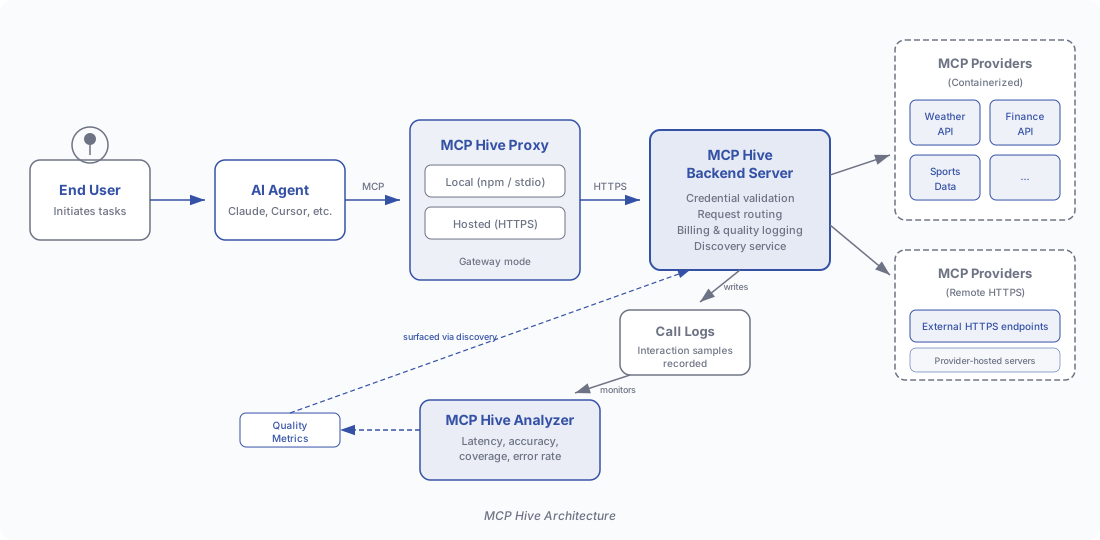
The architecture follows a left-to-right flow: an End User initiates a task through an AI Agent, which connects to the MCP Hive Proxy (local or hosted). The proxy forwards requests over HTTPS to the MCP Hive Backend Server, which routes them to the appropriate MCP Providers. Providers may be containerized servers managed by MCP Hive or remote HTTPS-hosted servers operated by the provider themselves.
End-to-End Flow
The following sequence diagram illustrates the complete lifecycle of an MCP Hive interaction.
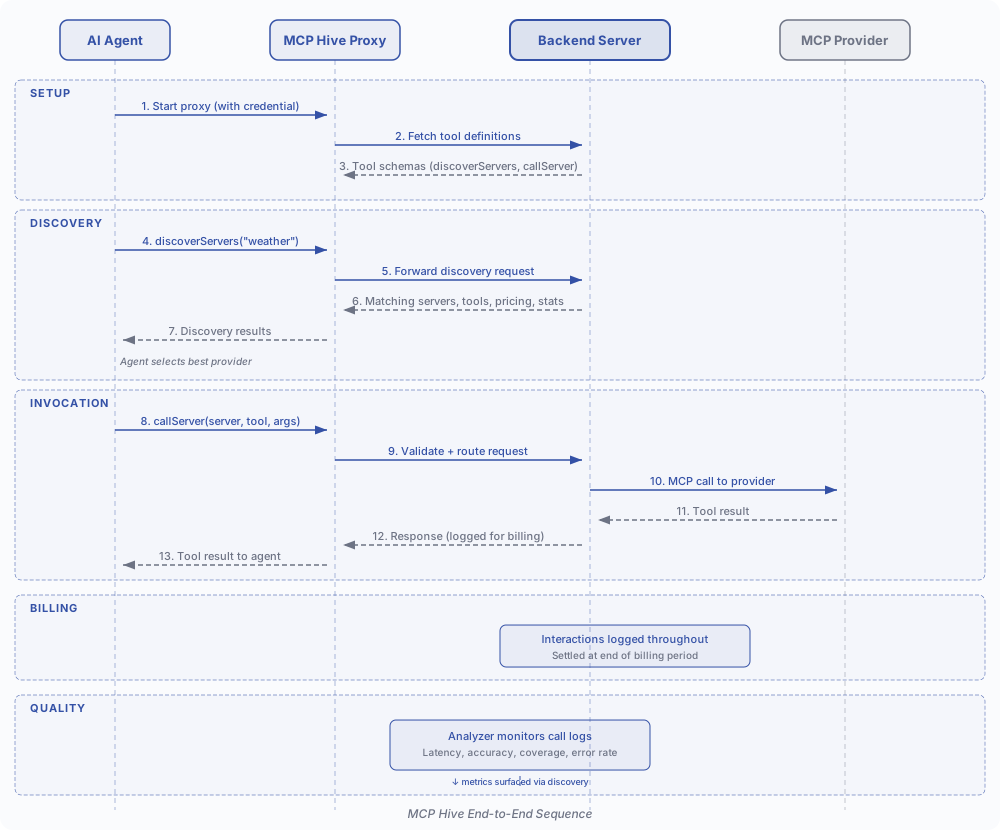
Phase 1: Setup
- Start the proxy - The AI application starts the MCP Hive Proxy, passing the user's credential. The proxy connects to the Backend Server and retrieves the schemas for the gateway tools (
discoverServers,callServer). - Register tools - The proxy presents these tools to the AI agent as standard MCP tools, ready for use.
Phase 2: Discovery
- User makes a request - The user asks a question requiring external data (e.g., "Plan a sunny weekend in Montreal").
- AI agent discovers servers - The agent calls
discoverServerswith relevant keywords (e.g., "weather"). The Backend Server returns matching servers along with their tools, descriptions, pricing, and vital statistics. - Agent selects a provider - Based on the discovery results - including quality metrics and pricing - the agent chooses the best provider for the task.
Phase 3: Invocation
- AI agent calls a tool - The agent calls
callServer, specifying the server name, tool name, and arguments. - Proxy forwards to server - The proxy packages the request with credentials and sends it to the Backend Server over HTTPS.
- Server routes to provider - The Backend Server validates the request, identifies the target provider, and forwards the MCP call.
- Provider responds - The provider executes the request and returns results. The response travels back through the server and proxy to the AI agent.
Phase 4: Billing
- Interaction logged - Every invocation is recorded with metadata including consumer, provider, tool, timestamp, latency, and response characteristics.
- Billing settled - At the end of each monthly billing period, consumers are charged and providers earn based on completed calls.
Discovery
Discovery is a key differentiator of MCP Hive. Rather than requiring clients to know which MCP servers exist ahead of time, AI agents can explore the marketplace dynamically.
The Backend Server's built-in MCP service implements discoverServers, which identifies tools relevant to the AI agent's task given a list of keywords. This search is fundamentally different from typical document search: it must understand the semantic intent behind keyword queries and match against tool capabilities, not just text content. An agent searching for "weather" should find forecast tools, climate data APIs, and atmospheric sensors - not just servers with "weather" in their name.
Discovery returns the following for each matching server:
| Field | Description |
|---|---|
| Server Name | The display name of the MCP server |
| Description | What the server does and what data it provides |
| Tools | List of available tools with input schemas and descriptions |
| Pricing | Cost per invocation for each tool |
| Vital Statistics | Latency, accuracy, coverage, and error rate metrics |
This allows AI agents to make informed decisions - choosing the most accurate provider, the fastest data source, or the most cost-effective option - all without human intervention.
Quality Assurance
MCP Hive maintains quality through a multi-stage process:
- Probation Period - Newly registered MCP servers undergo an initial testing period of at least 72 hours. During probation, the server is validated for correctness and robustness before being made available to consumers.
- Continuous Monitoring - After activation, every interaction is logged and periodically analyzed. The Analyzer computes vital statistics - latency, accuracy, coverage, and error rate - that reflect real-world performance.
- Transparency - Vital statistics are exposed through the discovery tools, so AI agents and users can compare providers and make quality-driven choices.
Billing
MCP Hive handles billing transparently:
- Interactions are logged throughout the month - Every call between consumers and providers is recorded with full metadata.
- Billing is settled at the end of each monthly billing period - Consumers are charged based on their subscription plan and any pay-per-use costs incurred. Providers earn based on the volume and value of calls they have completed.
- Pricing is always visible - During discovery, each tool's cost is displayed so there are no surprises.
Getting Started
Ready to connect? See the setup guides:
- For MCP Clients - How to install the proxy and start using MCP Hive
- For MCP Providers - How to register your MCP server and start earning